Mostrar mensagens com a etiqueta help. Mostrar todas as mensagens

segunda-feira, 14 de janeiro de 2013

iClapper - Control your Mac with claps!


The technology has no limits ... ok but will not yet know what those limits are. So give programmers the technologies usefulness and functionality put at our disposal.
This application that we present can now be used for various purposes, from helping someone with a disability, to develop a resource that takes advantage of this remote through palms.
The sounds have always been seen as an effective way to give commands to machines and calculated "ears" of the Mac's can be used to connect and manage applications and services. This application is not as complete as it can be to come in the future, because their margin for improvement is huge, but here is already a good base to work from.

Let us then serve this application, the commands that are available for free, to show that it is possible, remotely, enabling multiple commands using the palms. The video below shows the example that can use easily. Of course the goal is to expand the capability for more applications and services and there are more options in addition to free, paid for a package that can acquire. It was interesting in the future be more services.


Using the iClapper ...

One. Download the iClapper from the Mac App Store and open it on your computer. Has the link at the end of this article.
2nd. You will be rewarded with a video introduction to the service and will have to do the calibration of the actions to the application "know" the sound of his palms. Note the noise around you.
3rd. After finishing the calibration may now apply the rules tab Actions within the application preferences.

Shares

1st. The window Preferences can be opened when the iClapper is open, from the menu bar . Here you can create various actions and to present different rules, among other features.

As an example let's rules for home use and others for use while at work.

2nd. As noted above, we can create a set of rules for each of the preferences. The rules consist of a command , an Action and a confirmation message , the latter option.

3rd. To create the rule clicking the button with the sign + (plus) , located at the end of the column Rules . Then you can customize the command and the action to your liking.


4th. For commands , we can choose a number of combinations of palms or palms. If we choose a number of palms, we can choose clapping in the range of 2 to 5 palms.

If we choose a combination of palms, then we can have a first combination with X palms and have another combination with other X palms , can range from 1 to 5 for each set. We will have to adjust well defined intervals so you can make sense and that the application recognizes the pattern of these combinations.

5th. For actions, we can choose functions that already exist in the operating system, like Mac telling time or date. We can still make the application connect to iTunes, check e-mail or call pause QuickTime and, of course, if we pay by other packs.

You can buy packs of individual actions, costs 0.89 cents each or you can buy the full pack, with those who are available for, and the assembly cost 3:59 €. It's a good deal.

6th. To remove rules, simply select the rule and click the sign - (minus) that lies at the end of the column Rules , next to the button that adds.

Other Functions

1st. We can have notifications iClapper. We can be notified when the application recognizes a September palms, a command, etc.., including putting Growl for this purpose. This can be enabled on the tab Notifications .

2nd. We can select the input signal devices, we want to see used in iClapper. For example, we may want to use an external microphone and not the Mac, it can be parameterized in the separator Input Device .

In summary ...
iClapper is a very simple tool to use. Anyone can use the palms more vigorously or softer to order the Mac to connect or disconnect applications and services. Opens a multitude of options, well exploited by the developers of this tool in the future, can be very useful especially in terms of accessibility.
If they want to see something more evolved, I suggest you watch the Pro version of this application.

JailBreak reached the tablets with Windows RT

Unlike the markets for PCs, which is in total decline according to data from IDC , the market for tablets has grown substantially in recent years, having been sold 17 million devices in 2010, 65 million in 2011 and 122 million in 2012.
The Apple iPad continues to be a leader in this isolated segment (about 57% of the market), but in recent times there has been a significant growth of tablets sold with Android, especially after the entry of the Nexus 7 and clear the equipment from Samsung . Microsoft remains committed to achieving a reference position in the segment of tablets, and there are many manufacturers who have bet on devices with Windows.Samsung . Microsoft remains committed to achieving a reference position in the segment of tablets, and there are many manufacturers who have bet on devices with Windows.
Recently, the XDA site, the tool was released RT Jailbreak Tool for "unlocking the restrictions" of tablets with Windows RT allowing the installation of applications not signed by Microsoft ARM.


jailbreak_00


With the release of Jailbreak Tool tool RT users with tablets with Windows RT now have the ability to install applications ARM, not signed / certified by Microsoft and who are outside the Windows Store. The tool makes use of a vulnerability in the Windows kernel RT.
Microsoft responded by stating that it would consider such a tool, and that would be taken appropriate action. However, even in December 2012, Microsoft has announced that the tool is fully secure and appreciated the work done by the investigator netham45 .
We are aware of the social engineering technique That Could use the tool to bypass an app restriction in Windows RT devices. This issue is not a security vulnerability, and we have not seen attempts to take advantage of this social engineering technique. In order for this social engineering technique to be successful, the user would need to be lured to click on a malicious link, and click through Also an additional security alert. As always, we Encourage all customers to avoid opening suspicious links and emails. We will continue to appreciate the work of Researchers, and we will take action to help protect Appropriate customers.
windows_rt

As tablets with Windows RT typically use Secure Boot, you must always run the jailbreak tool so you can get back to run / install unsigned applications compiled for ARM.
Note that, currently, there are already several applications recompiled for ARM including most importantly Putty, Notepad + +, 7-Zip, TightVNC, among other RDP client. Confirms here the list of applications already ported to Windows RT.
So far there is still no solution from Microsoft to resolve this vulnerability. On page XDA Developers can be found more details about the tool and installation process.
After Installous have been turned off ...

"Will .. RT Jailbreak for Windows is a factor that can lead users to purchase tablets with the Microsoft operating system?"

sábado, 12 de janeiro de 2013

Complete the Start menu in Windows 8


In truth there is much talk about the new look of Windows 8, but a question that is arising more frequently is the absence of the traditional Start menu and the Start button.
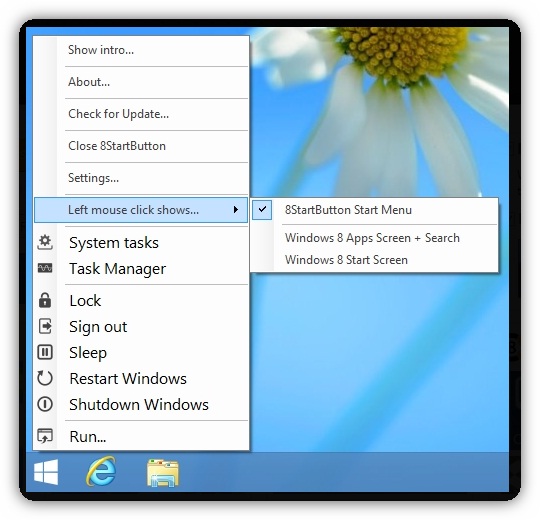
As our readers probably already guessed, the 8StartButton is a tool that can be used to restore the Start button in a way that allows us to learn and benefit from all the new features and options that can be found in Windows 8, and that the  former  Start menu has accustomed us over the years. Let us know?


Obviously there are several tools that want a Start menu in Windows 8, but the 8StartButton do it in the most immediately recognizable, ie the Start button simply works as expected and delivers what we really want it. It almost goes without saying that the tool is not limited only to bring back the Start menu, but it also gives us greater control over the appearance and function.


The tool allows us to choose choose from one of the many ready images of the Start button, or choose to use one of our own preference and there are numerous ways in which we can customize how the menu itself works.


Nevertheless, it should be borne in mind that while the 8StartButton is certainly recognized as a Start menu, users may not face exactly the same as the menu found on previous versions of Windows - it is this rather a renovation and addition the new and controversial look of Windows 8.
As a complement, the tiles can be included in the Start menu for easy access to our most used tools, and the right-click menu can be customized to allow access to additional options.

No matter which direction we have chosen for our taskbar, with 8StartButton can be integrated in all positions and a low consumption of system resources - this means we can take advantage of this application without compromising performance.
The free version presented here is really just a sample of what we can expect in the full version. For only $ 14 this can be possibly a cheap way to make Windows 8 work the way you want!