Mostrar mensagens com a etiqueta 8. Mostrar todas as mensagens

terça-feira, 22 de janeiro de 2013

Microsoft Announces Poker game for Windows 8!

Being one of the most played game types worldwide, whether playing or hurt (especially the wallet) would not be surprising that the Poker arrive sooner or later the United Microsoft.
Thus, recently announced the launch of World Series of Poker : Full House Pro due out this spring.
World Series of Poker: Full House appear well this spring for Xbox Live and Windows 8 with new game modes, representation of casinos and real possibility of further games.


However, leaders of Microsoft ensures that the genetic chain of World Series of Poker will remain untouched " transmitting gamers either the Xbox 360 or PC, all the authenticity of a World Series of Poker event real, a totally realistic way . "
World Series of Poker: Full House offers the following features:
  • Availability of service total 24 × 7 where players can come and go at any time in games.
  • Promise to offer daily packs of chips the player can enjoy and so go on evolving career.
  • Updated content and many new features
  • Continue a game on Xbox 360 or a system with Windows 8, which means you can play a game and resume anywhere and anytime.
  • Variety of game modes, from the Singleplayer mode to simple online games or international tournaments.
  • World Series of Poker: Full House presents the comments of professional ESPN, Lon McEachern and Norman Chad thus giving a more credible to the game.
Here is a Trailer from the game:

quarta-feira, 16 de janeiro de 2013

GMusic, Google Music is also on Windows 8

The Google Music service is still not available in Portugal, despite being slowly being extended to other countries. This was not a limitation to their use, and anyone could register this service.
With Google's decision not to develop native applications for Windows 8, its users must seek alternatives to using this new operating system.
That's where the GMusic, an application for Google Music account access from Windows 8.


The GMusic is not, of course, a Google application but it will not take away any merit or features.
Can you give users all the features you can find on the site Google Music, but with the advantage of being within the interface of Windows 8.
Once authenticated the user has direct access to songs that have this service available, whether you sent or however you bought. These songs are presented in a list, organized by playlists, artists, albums and genres by.
Access to one of these categories presents to you the songs that compose it and then we can access them.
The GMusic is also, of course, a reader of those songs, which allows it to be integrated with Windows 8 so they can hear your music while using Windows 8.
The research, and because it is a Windows 8 is integrated and allows to easily find songs or artists seeking.
The GMusic has available a large number of keyboard shortcuts that allows direct control from the keyboard of your computer without having to use the mouse.
Two other features that GMusic have available so easy is to create new playlists and sort songs.


The GMusic is a viable alternative for those who want a Google Music client that integrates directly with Windows 8.
None of these tools are expected from Google in the near future and therefore it is necessary to use these alternatives.
If users are Google Music and your OS is Windows 8 then GMusic is a mandatory presence in your system. Test it and tell of your righteousness!

sábado, 12 de janeiro de 2013

Complete the Start menu in Windows 8


In truth there is much talk about the new look of Windows 8, but a question that is arising more frequently is the absence of the traditional Start menu and the Start button.
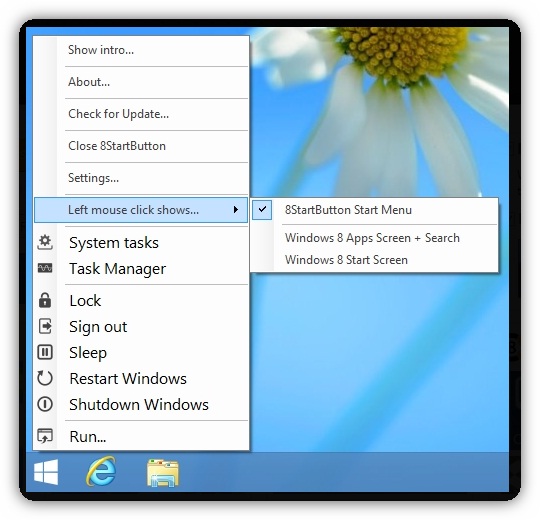
As our readers probably already guessed, the 8StartButton is a tool that can be used to restore the Start button in a way that allows us to learn and benefit from all the new features and options that can be found in Windows 8, and that the  former  Start menu has accustomed us over the years. Let us know?


Obviously there are several tools that want a Start menu in Windows 8, but the 8StartButton do it in the most immediately recognizable, ie the Start button simply works as expected and delivers what we really want it. It almost goes without saying that the tool is not limited only to bring back the Start menu, but it also gives us greater control over the appearance and function.


The tool allows us to choose choose from one of the many ready images of the Start button, or choose to use one of our own preference and there are numerous ways in which we can customize how the menu itself works.


Nevertheless, it should be borne in mind that while the 8StartButton is certainly recognized as a Start menu, users may not face exactly the same as the menu found on previous versions of Windows - it is this rather a renovation and addition the new and controversial look of Windows 8.
As a complement, the tiles can be included in the Start menu for easy access to our most used tools, and the right-click menu can be customized to allow access to additional options.

No matter which direction we have chosen for our taskbar, with 8StartButton can be integrated in all positions and a low consumption of system resources - this means we can take advantage of this application without compromising performance.
The free version presented here is really just a sample of what we can expect in the full version. For only $ 14 this can be possibly a cheap way to make Windows 8 work the way you want!